Quickstart
Get started with Nashra step by step: sign up with an email code or Google, the one-page setup (your name, your Hub address at yourname.nashra.website, the language you publish in), your Hub going live right away (or when you verify your email), the Finish your Hub checklist and its handoff to your first post, the four-step Getting started guide, publishing your first post and sending it to subscribers from the publish notice, and ways to let people subscribe. Also covers switching the dashboard between English and Arabic, which language your Hub and emails appear in, and help while you work (Product tour, tutorials, Academy, Support).
Overview
Sign up, choose a name and an address, and your Hub is live. From there, Nashra walks you around one loop: publish something, see it on your Hub, give people a way to subscribe, and email them.
Live in minutes
Your Hub goes live as soon as you finish the setup page.
Free to start
No credit card required.
Step 1: Sign up
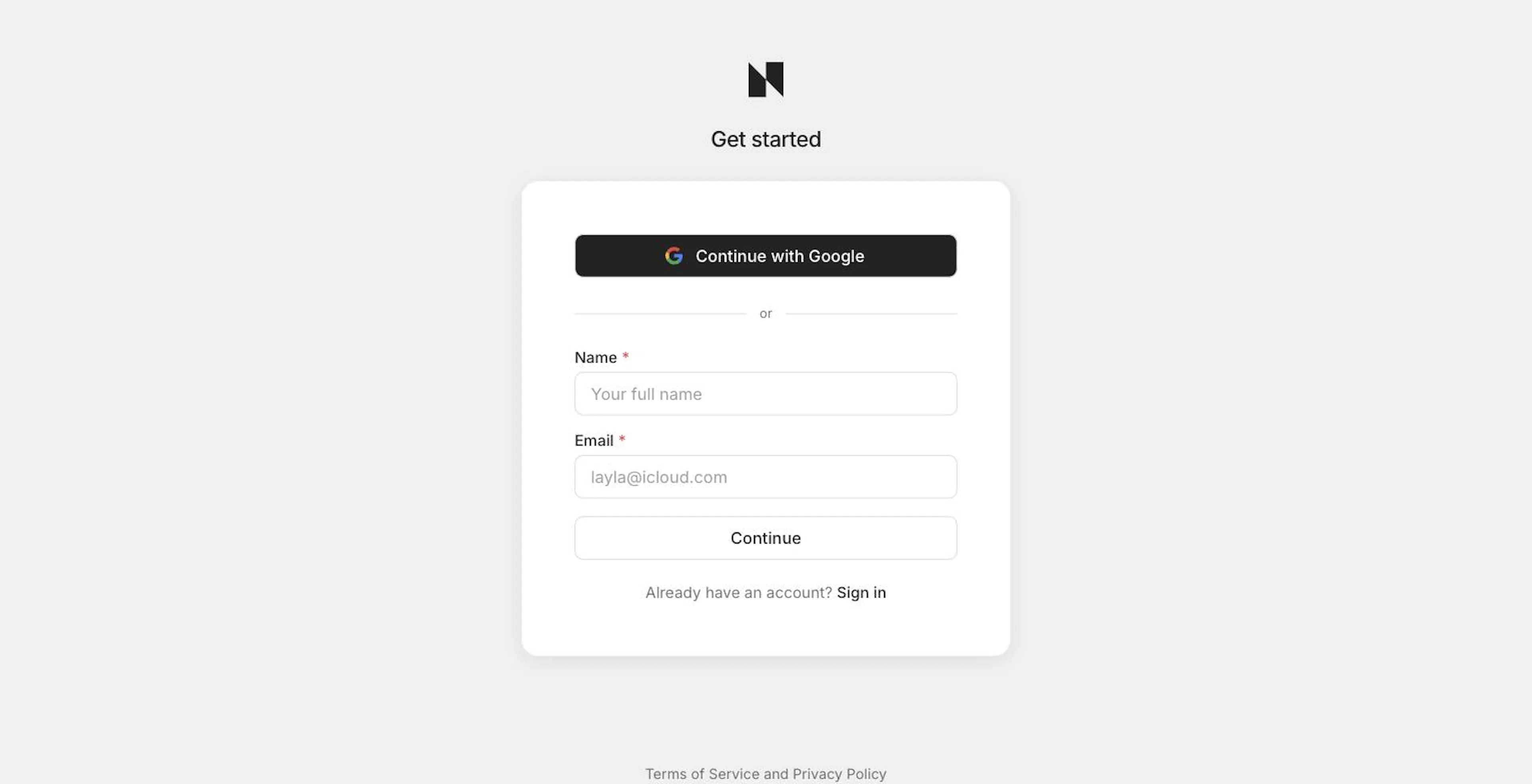
Go to nashra.ai and click to get started. Choose Continue with Google, or enter your name and email. If you use email, Nashra sends you a one-time code to confirm the address. There's no password to set. If a quick security check appears above Continue, complete it first.
If you come from Nashra's Arabic site, or your browser prefers Arabic, the sign-up page opens in Arabic. See Dashboard language.
Step 2: Set up on one page
Setup is a single page, Let's set you up. Fill in three things and click Continue.
Your name or brand
This is the name on your Hub and in your emails. As you type, Nashra fills in a matching address below.
Your Hub address
Your free address, like your-brand.nashra.website. It can use English letters, numbers, and dashes only. If your name is in Arabic or another script, the address stays empty, so type one yourself.
Language you publish in
Your Hub and posts appear in this language. Choose from English, Arabic, Spanish, Portuguese, French, German, Chinese (Simplified), Hindi, Japanese, or Indonesian. Arabic sets your pages right-to-left.
A checkbox below lets you choose whether to get Nashra product news. You can change your name and language later.
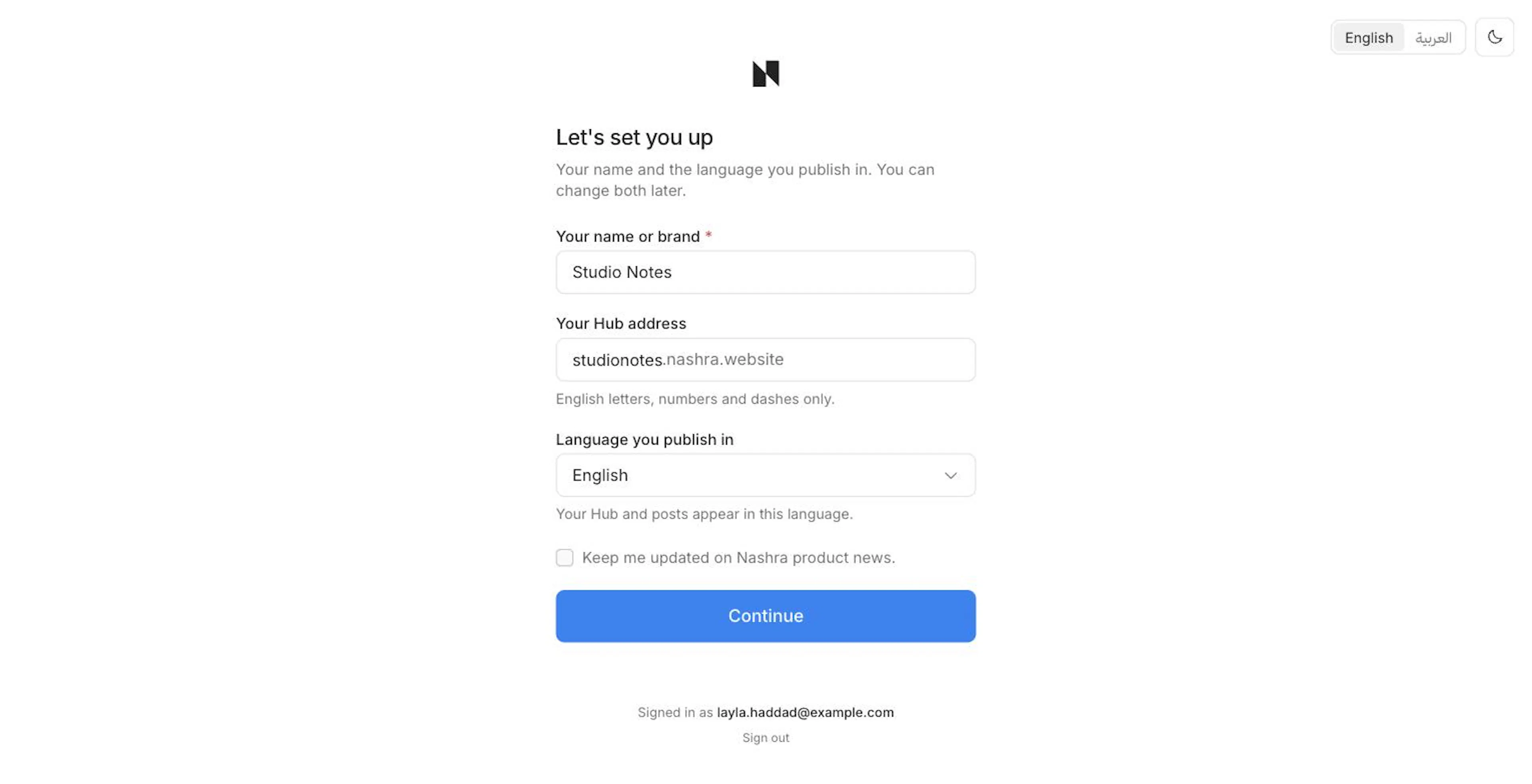
The English / العربية switch in the corner changes the dashboard language right away, before you fill anything in. The button beside it switches between light and dark mode.
Your logo, colors, fonts, team, and subscriber imports aren't part of setup. Nashra asks for them later, when you need them.
Step 3: Finish your Hub
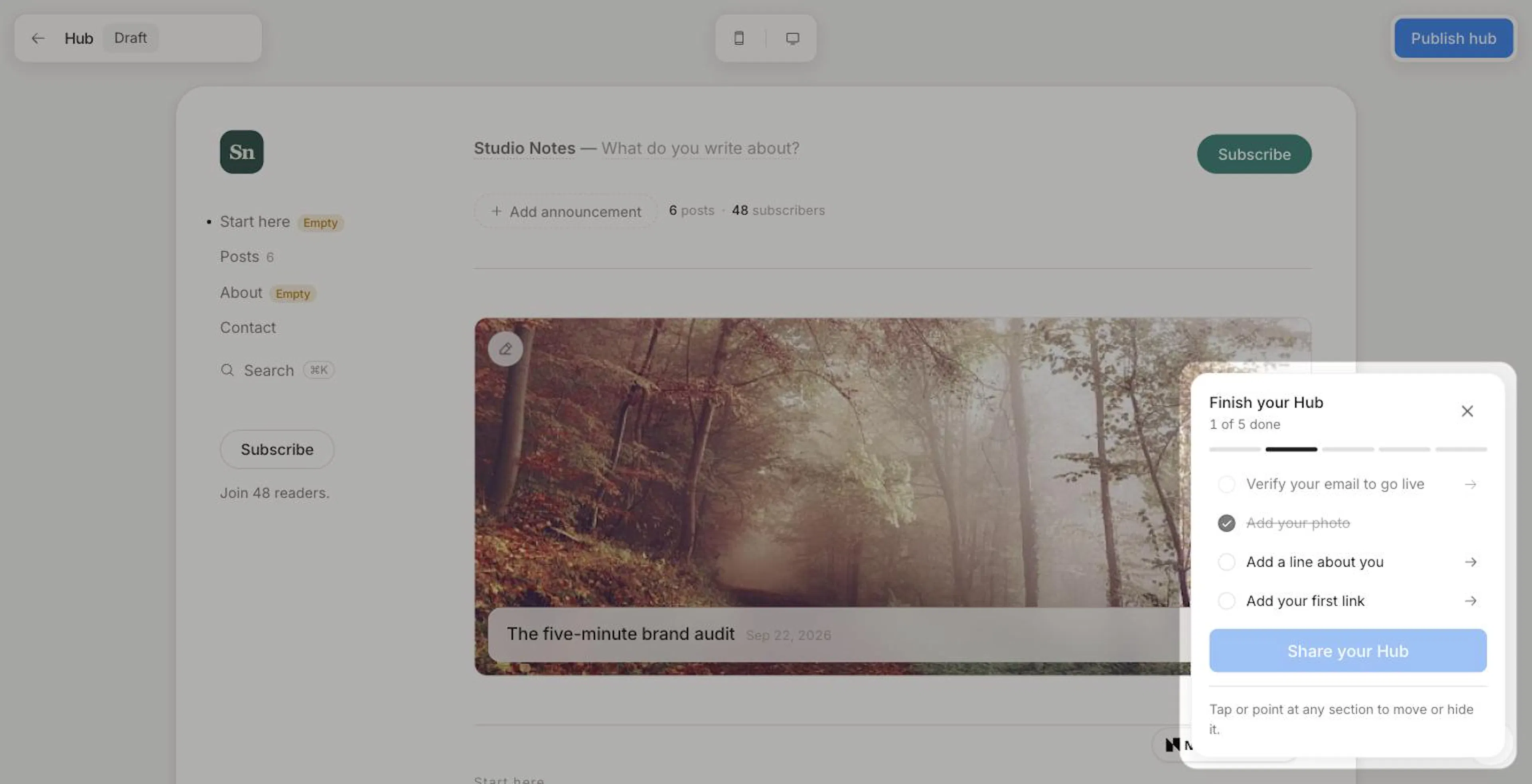
After Continue, you land in the Hub editor, and your Hub is already live at your address with your name and a subscribe form. If you signed in with Google, your Google photo becomes your Hub photo until you choose another. If your email isn't confirmed yet, your Hub goes live the moment it is: the link in the verification email opens the Hub editor, publishes what you've done so far, and opens the share dialog.
A Finish your Hub checklist sits in the corner:
- Your Hub is live (or Verify your email to go live)
- Add your photo
- Add a line about you
- Add your first link
- Share your Hub
On your first visit, the page dims around the checklist. Pick a step and the highlight moves to the part of the Hub you need to fill in. Add your photo opens a dialog where you choose a photo, then zoom and frame it.
When every step is done, the checklist reads Your Hub is ready, with one button: Publish your first post.
Share your Hub opens a share sheet with Copy link, steps for adding the link to your Instagram bio, Share on WhatsApp, and a QR code. See The Hub for everything the editor can do.
Step 4: Follow the Getting started guide
Back in the dashboard, a Getting started guide docks in the corner. It picks up where the Hub checklist leaves off, so nothing is ticked when you arrive:
| Step | It ticks when |
|---|---|
| Publish your first post | A post is published |
| Send your first email | An email has gone out |
| Import your subscribers | Your audience has at least one subscriber who isn't on your team |
| Create your first resource | You've created a resource |
The guide reads your workspace as it is, so a step ticks the moment the thing exists, and unticks if you undo it. Click any step to go straight to the right page. When every step is done, the guide says You're all set and tucks itself away.
Minimize shrinks the guide to a small button showing how many steps are left. Close hides it. To bring it back, click your name at the bottom of the sidebar and choose Getting started.
Step 5: Publish your first post
Create a post
Open Library in the sidebar, click Create, and choose Post.
Write
Add a title, then write. Select text to format it, or type / to insert blocks. Your post saves automatically.
Publish
Click Publish. Your post goes live on its own page and takes its place on your Hub.
Until you've sent your first email, publishing a post shows Your post is live on your Hub, with Send to subscribers (it opens the send steps below) and View in Hub.
See The Editor and Publishing Posts for more.
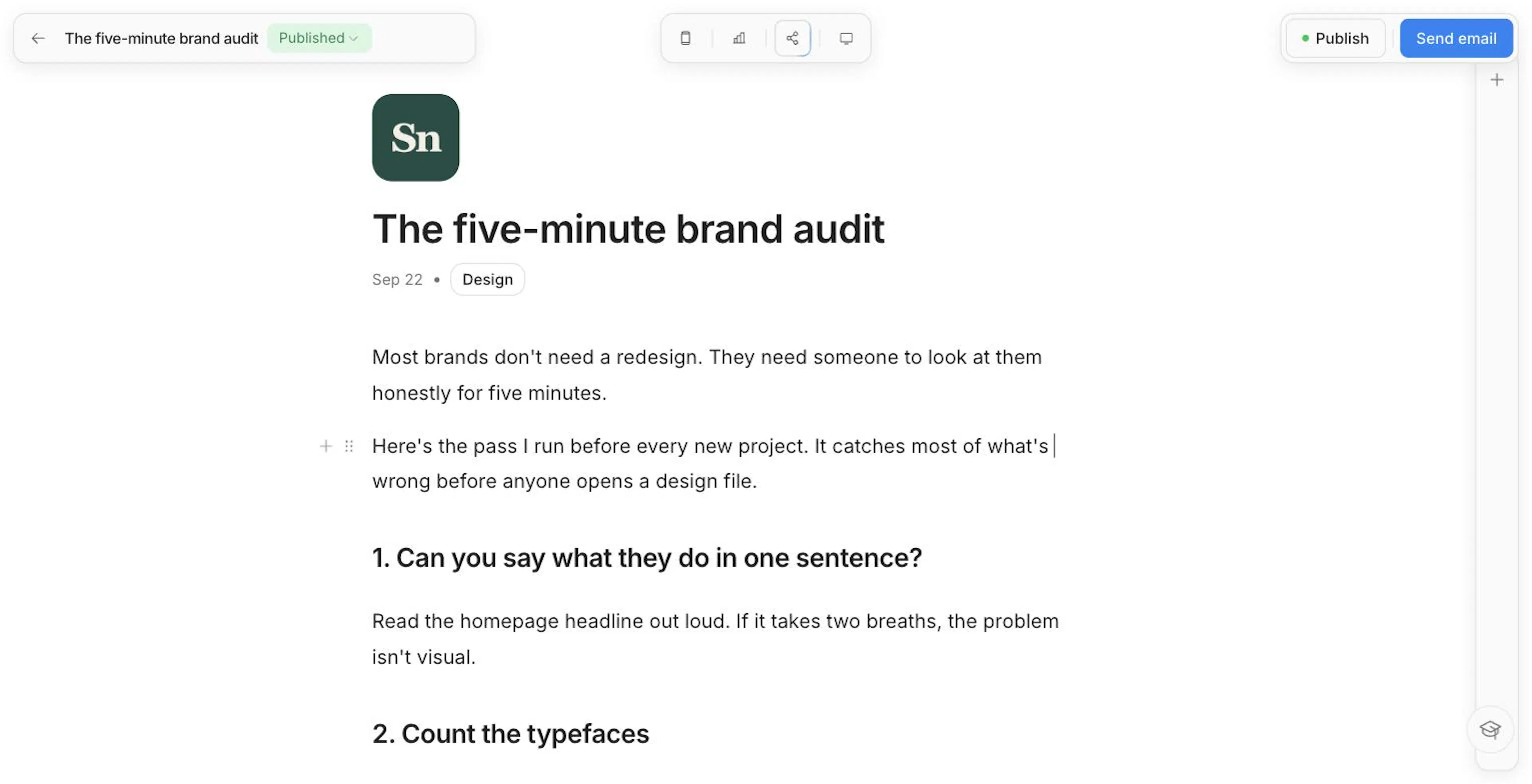
Step 6: Send your first email
From the post, click Send email.
Write the subject
Add a Subject and optional Preview text. Click the sparkle in the subject field if you'd like Nashra to suggest one.
Choose who gets it
Send to All subscribers or a segment.
Test, then send
Use Send a test to check it in your own inbox. Then send it now, or schedule it for later.
You need at least one subscriber to send to. Import your list from Audience, or share your Hub and let people join. See Sending Newsletters.
Step 7: Give people a way to subscribe
Everyone who subscribes, wherever they do it, joins the same audience, tagged with where they came from.
- Your Hub: every Hub has a subscribe form built in. Share its link anywhere.
- Resources: a page that trades a guide, template, or download for an email. Create → Resource in the Library. See Resources.
- Landing pages: full pages for an offer, a waitlist, or an event, built from sections. Create → Landing page in the Library. See Landing Pages.
- Forms on your own site: embed a signup form, or point an existing form at Nashra, from Settings → Forms. See Form Actions.
Dashboard language
The dashboard is available in English and Arabic, written by the Nashra team rather than machine-translated. It mirrors to right-to-left in Arabic.
Nashra picks a language before you ask. If your browser prefers Arabic, or you're signing up from the Middle East or North Africa, you start in Arabic. Links from Nashra's Arabic site open the app in Arabic too.
To switch at any time:
- Account menu: click your name at the bottom of the sidebar. The language item is labeled in the language it switches to: العربية or English.
- Settings: go to Settings → Account → Language and choose a Dashboard language.
The page reloads in the new language. If you switch between workspaces that publish in different languages, Nashra may offer to switch the dashboard to match. It's only ever a suggestion.
Your dashboard language covers:
- Every label, menu, and message in the dashboard
- Dates, including month and weekday names
- Messages from Nashra's servers, such as form errors and notices
- Emails Nashra sends to you, like sign-in codes, receipts, and team invitations
Dashboard language vs. publishing language
The dashboard language is yours. It never changes your content. What your readers see follows your workspace's publishing language, the one you picked at setup.
| Dashboard language | Publishing language | |
|---|---|---|
| Who it's for | You and your team | Your readers |
| Options | English, Arabic | English, Arabic, Spanish, Portuguese, French, German, Chinese (Simplified), Hindi, Japanese, Indonesian |
| Covers | The dashboard and Nashra's emails to you | The words Nashra adds to your Hub, posts, landing pages, and resources (like Subscribe), and the unsubscribe link in your emails |
| Where to change it | Account menu, or Settings → Account | Settings → General → Language & region |
Choosing Arabic as your publishing language sets your pages right-to-left. Nashra's own error pages, like a missing-page notice, appear in English or Arabic based on each visitor's browser and region.
Help while you work
- Tutorials: pages with a video lesson show a Tutorial button in the corner. Lessons play only when you click it. The one exception is connecting a custom domain, where the lesson opens by itself, muted, the first time you visit. To turn tutorials off everywhere, hover that button, click its dismiss mark, and confirm Turn off. Bring them back with Turn on tutorials in the account menu.
- Product tour: a six-part tour of how the pieces connect. Open it from Product tour in the account menu.
- Academy: video lessons on nashra.ai. Open Academy from the account menu.
- Support: click Support at the bottom of the sidebar to open a support chat.