
HTML Forms & Form Actions
Add a signup form to your own website — plain HTML, Webflow, Carrd, WordPress, or a form tool's webhook — by pointing it at a Nashra HTML form endpoint (form action URL). Creating one in Settings → Forms, field names including the WhatsApp phone field, Redirect vs. JSON responses, the thank-you page, email confirmation, spam protection, and rate limits.
Collect signups on your own website
To collect subscribers on your own website instead of a Nashra-hosted page, keep your own signup form and point it at a Nashra HTML form. Your form's design, fields, and placement stay yours. Only the form's action changes: it submits to a Nashra endpoint, and every submission becomes a subscriber with the tags, confirmation rule, and after-submit behavior you set.
Nashra doesn't give you a snippet to embed, and it doesn't draw the form. You write the form, or your site builder does, and Nashra receives what it sends.
Want Nashra to host the page instead? A resource is a ready-made signup page you can share anywhere, and your Hub and landing pages have signup forms built in.
Creating an HTML form
Open Settings → Forms
From the sidebar, open Settings, then Forms, and click New HTML form.
Choose a response type
Redirect sends visitors to a thank-you page after they submit. JSON returns a response for your own code to handle. See Redirect vs. JSON response.
Name it and add tags
Give it a name you'll recognize, like "Footer signup". Under Auto-tag submissions, add the tags everyone who subscribes through this form should get.
Set the thank-you page
In Redirect mode, Thank-you URL is required. Paste a link, or start typing to search your own posts, landing pages, resources, and Hub. Error URL is optional.
Decide on email confirmation
Require email confirmation starts from your workspace's double opt-in setting, which the dialog shows as "Workspace default: On" or "Off". Change it for this form only if you need to.
Generate the endpoint
Click Generate endpoint, then Copy link in the confirmation that appears. That's your form action URL.
The Forms list shows each form's Name, Endpoint, and Subscribers count. Click an endpoint to copy it, or click a row to edit the form. The edit dialog shows the endpoint with its own copy button, and has Delete form at the bottom. Deleting a form breaks anything that still posts to it.
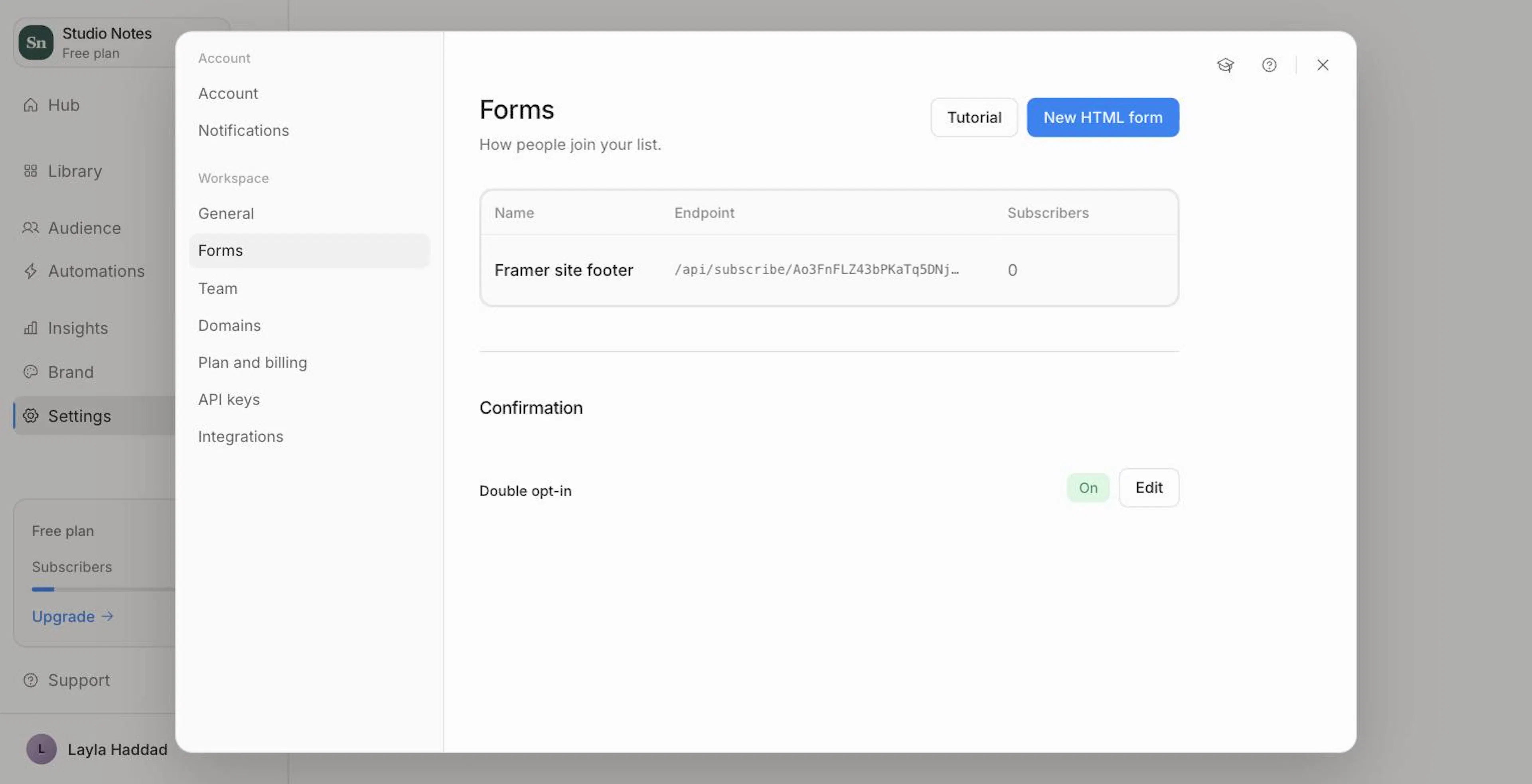
Form action URLs
Every HTML form has one endpoint:
POST https://app.nashra.ai/api/subscribe/{identifier}
Nashra generates the {identifier} for each form. It's what ties a submission to that form's tags, confirmation rule, and after-submit behavior. Use the URL as your form's action with method="POST", or as the webhook URL in a form tool.
Field names
Name your inputs so Nashra knows what each one is:
| Field | Name to use |
|---|---|
| Email (required) | email. Email, EMAIL, eMail, E-mail, and E-Mail also work, but lowercase keeps things predictable. |
| First and last name | first_name, last_name |
| WhatsApp number | phone, optional. Send it in full international format (+971…), or send a local number plus phone_country with a two-letter country code such as AE. It's saved in international format on the subscriber's profile. |
| Custom fields | The field's data name. Click View form fields in the form's dialog to see every field with a copy button, and which ones are Required. |
Any custom field marked required in Audience → Fields is required on every HTML form, and a submission without it is rejected. Either include it in your form or make it optional. Resources are different: they only enforce required fields you've added to that resource.
Example
A minimal HTML form, with a hidden spam trap (see Spam protection):
<form action="https://app.nashra.ai/api/subscribe/YOUR_IDENTIFIER" method="POST">
  <input type="text" name="first_name" placeholder="First name">
  <input type="email" name="email" placeholder="Email" required>

  <!-- Spam trap: people never see it, bots fill it in -->
  <div aria-hidden="true" style="position:absolute; left:-9999px;">
    <input type="text" name="website" tabindex="-1" autocomplete="off">
  </div>

  <button type="submit">Subscribe</button>
</form>
A landing page's Signup section is tracked as its own form behind the scenes, just like an HTML form. That means you can scope an automation trigger to one landing page's signups too. See Automations.
Connecting popular tools
Any tool that lets you set a custom form action or a webhook URL can send subscribers to Nashra:
- WordPress — Contact Form 7, WPForms, or any form plugin that supports a custom action or webhook
- Carrd — Paste the URL into the form's action field
- Webflow — Set the form's action to the URL and its method to POST
- Plain HTML — Set the
actionattribute on the<form>element
When a tool calls the URL as a webhook from its own servers, set the form's response type to JSON. The endpoint reads top-level field names such as email. If a tool's webhook wraps answers in its own nested format, put a connector like Zapier or Make in between to map them.
For step-by-step guides to specific platforms and services, see Integrations.
Redirect vs. JSON response
| Response type | Best for | What happens |
|---|---|---|
| Redirect | Websites with a plain form submit | On success, the visitor lands on your Thank-you URL. If the signup fails, they go to your Error URL, or back to the page they submitted from if you didn't set one. |
| JSON | Custom code and webhooks | The endpoint returns JSON for your code to handle. |
Most marketing sites should use Redirect. In JSON mode, a successful signup returns HTTP 201 with one of these messages: "Successfully subscribed", "Please check your email to confirm your subscription", or "You are already subscribed". A failed signup returns 422, and an unknown or deleted form returns 404.
If your code posts a JSON body (Content-Type: application/json), it gets JSON back even from a Redirect form. That way a script-driven form works in either mode.
Some submissions fail validation: a missing or malformed email, or a missing required custom field. Those get a 422 JSON response in either mode, before any redirect. Check those fields in your own form as well, for example with required and type="email", so visitors never see a raw error.
Redirect forms saved before the Thank-you URL became required now send visitors to Nashra's own confirmation page. It tells anyone who still needs to confirm to check their inbox. Before this change, visitors saw a page of raw JSON. Add a Thank-you URL to send people to your own page instead.
Email confirmation
Each HTML form has its own Require email confirmation switch. New forms start with your workspace's double opt-in setting, found under Settings → Forms → Double opt-in, and new workspaces start with double opt-in on. When it's on, new subscribers get a confirmation email and join your list after they click it. People already on your list, whatever their status, are never asked to confirm again. See Double opt-in.
Spam protection
Visitors never see a CAPTCHA. Public signups are protected by a hidden spam trap and by rate limits instead.
- Honeypot — Nashra treats any submission that fills in a field named
websiteas a bot. It returns the same response a real signup gets, but nothing is saved. Add a hiddenwebsiteinput to your own form, as in the example, to get the same protection. If your workspace has a custom field whose data name iswebsite, that field is treated as real data and the trap is off.
Auto-tagging
Every HTML form can tag its subscribers automatically. Use tags to track:
- Source —
homepage-footer,sidebar,newsletter-cta - Campaign —
spring-launch,webinar-2026 - Page — Create a separate form for each page if you want to know which page someone signed up on
Rate limiting
Each visitor's IP address can send up to 10 signup submissions a minute. The same email address can be submitted to a form up to 10 times in 10 minutes. The limits count per visitor, not per form, so a launch spike from many different people goes through normally.
A tool that posts from its own servers, like a webhook, sends every submission from the same few addresses. If you expect more than about 10 signups a minute through one of those, contact support before you launch.