The Hub
How your Hub works: the one public home for your workspace at yourname.nashra.website. Covers sections (Start here links, Posts, Services, Products, Events, Resources, Videos, About, Contact), pinning the showcase, link cards, covers and focal points, adding and cropping your photo (it becomes your logo everywhere), the always-on subscribe form and subscriber mural, draft autosave vs. Publish hub (Update once live), publishing before and after you verify your email, the Finish your Hub checklist and its handoff to your first post, the Share dialog, the Messages inbox for Contact messages (subscriber match, read and unread, replying from Nashra), broken links, the Nashra badge and plans, mentions, and where Hub analytics live.
What is the Hub?
The Hub is your workspace's public home. It lives at the root of your address (yourname.nashra.website, or your own domain on Pro and Business), and it's the one link you put in your Instagram, X, or TikTok bio.
You don't rebuild it every time you publish. The Hub organizes your work for you:
- Posts you publish join the archive.
- Landing pages join a Services, Products, or Events section, based on what they're for.
- Resources you publish to the Hub get their own section.
- Videos you add are collected into a section of talks and guest appearances.
You decide what gets emphasis. You can pin one thing to the top, add the links visitors should see first, and reorder, rename, or hide any section. Every Hub also has a subscribe form, a contact form, and search.
Each workspace has exactly one Hub.
The Hub replaces the old separate Bio Page and post-archive page. Old links to /pages/bio now open the Hub. The Hub has its own editor, so landing-page sections and the landing-page AI Agent aren't available here.
Your Hub is live from day one
When you set up your workspace, you choose your Hub address. It can contain lowercase English letters, numbers, and dashes. Your Hub goes live straight away with your name and a subscribe form. If you signed up with email, it goes live as soon as you verify your email. If you edited your Hub before verifying, the link in the verification email opens the Hub editor, publishes your edits, and opens the Share your Hub dialog. If you signed in with Google, your Google photo becomes the Hub photo until you choose another.
To open the editor, click Hub in the sidebar. To see the live page, hover the Hub item and click Open Hub.
The editor
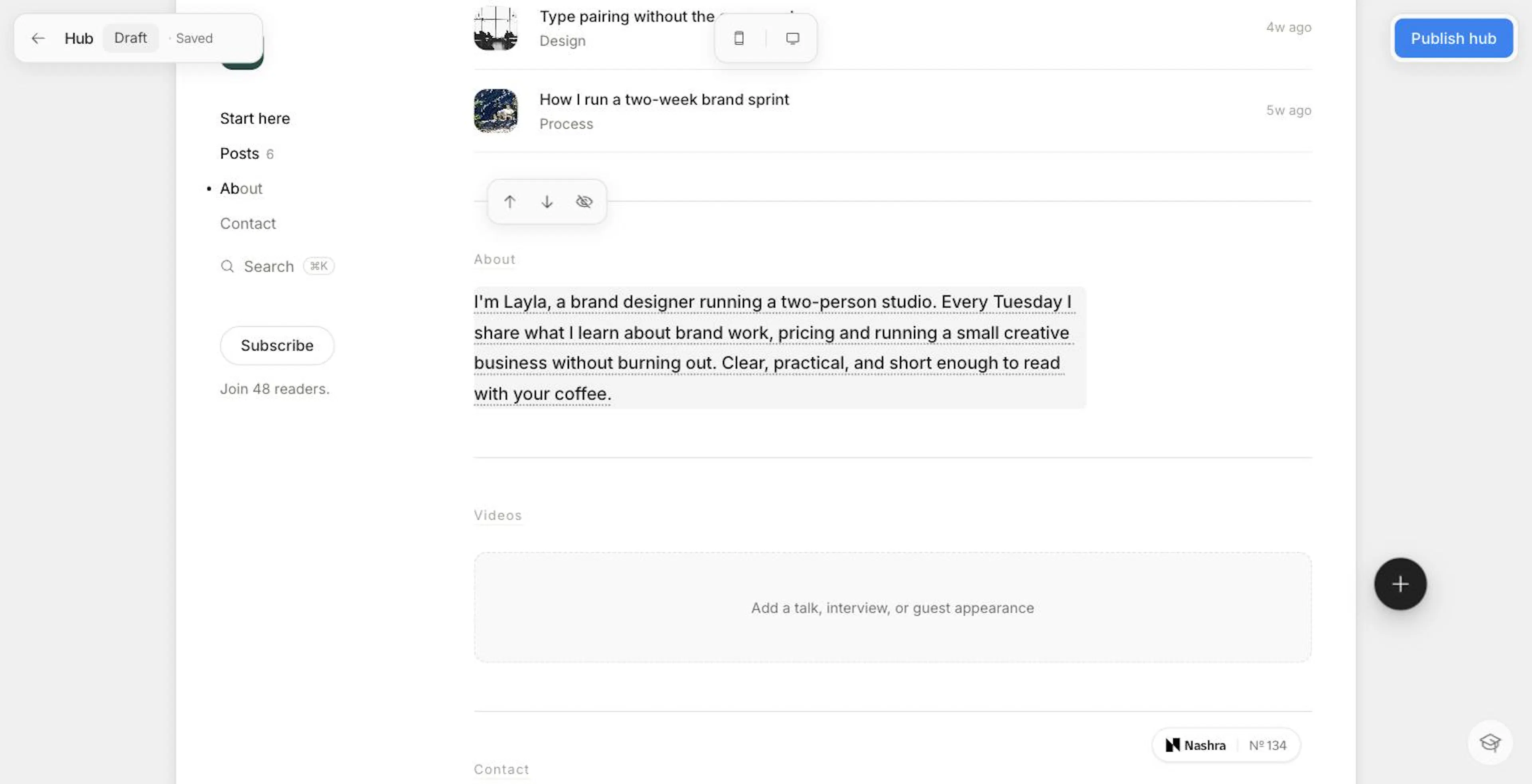
The editor shows your Hub exactly as visitors see it, and you edit it in place:
- Text: click the name, the line about you, a section heading, or the About text and type.
- Controls: hover or tap a section or card to show a small pill of controls on its edge. A card's controls take priority over the section it sits in.
- Preview size: switch between desktop and mobile with the phone icon in the top bar.
A guided first session
A new Hub opens with a Finish your Hub checklist in the corner:
- Your Hub is live (or Verify your email to go live)
- Add your photo
- Add a line about you
- Add your first link
- Share your Hub
On a phone, the checklist rests as a small Finish your Hub pill with your progress. Tap it to open the list, and it folds back once you pick a step. On a larger screen, the page dims around the checklist on your first visit. When you pick a step, the highlight moves to the part of the Hub it names. After you fill that part in, the highlight goes back to the checklist. Press Escape or click elsewhere to lift the highlight.
When every step is done, the checklist reads Your Hub is ready and offers one button: Publish your first post. It stays in the editor until your first post is published, so it's still there when you come back after verifying your email. To close it for good, click ×. Closing the Getting started guide also stops it from coming back once your Hub has its line and links.
Drafts and publishing
Every edit autosaves to a draft. The top bar shows Saving… and then Saved. Your live Hub doesn't change until you click Publish hub (Publish on a phone). Once your Hub is live, the same button reads Update.
- The badge beside the title shows whether the Hub is Published or still a Draft.
- If you leave and come back, the editor opens on your draft, so an interrupted session picks up where it stopped.
- Link images save with the draft as soon as you pick them, so you can leave and come back without losing them. If an image is still uploading, Publish hub waits for it.
- If your email isn't verified yet, Publish hub opens a reminder that your Hub goes live when you verify your email. It has Resend for a new link and, for Gmail, Outlook, iCloud Mail, and Yahoo Mail addresses, a button that opens your inbox.
- Once your Hub is live, the top bar also has View, Copy link, and an Analytics chart icon.
Arranging sections
Every section except the masthead has a pill with Move up, Move down, and Hide section. A hidden section stays in the editor, dimmed and marked Hidden, so you can bring it back.
To rename a section, click its heading and type. For example, you could rename "Services" to "Work with me". Headings can be up to 40 characters.
The rail beside your Hub lists the sections in page order, with counts. In the editor, an Empty chip marks a visible section that still needs content. To remove every count from the Home without hiding any sections, hover the rail and click Hide counts. This hides the numbers on the rail, the masthead's post count, and the All posts row.
Sections
A new Hub starts in this order. You can rearrange it however you like:
| Section | What fills it | Notes |
|---|---|---|
| Masthead | Your photo, name, a line about you, a main button, an announcement, and your post and subscriber counts | Always first |
| Showcase | The link you pin, then your newest work | Has no heading. Doesn't appear while it's empty |
| Start here | Links you add | Shows six links on the Home, then All links |
| Posts | Your listed posts, newest first | Shows ten posts on the Home, then All posts |
| Services · Products · Events | Published landing pages with that purpose, plus links you file there | Each appears on its own once it has something to show |
| Resources | Resources set to Published | Appears once you have one |
| About | A few paragraphs about you | Up to 2,000 characters |
| Videos | Your talks, interviews, and guest appearances | Doesn't show on the live Hub until you add a video |
| Contact | A message form and your social links | Messages land in your Messages inbox and your reply-to address |
The masthead
- Name: click to edit it (up to 120 characters). If you leave it empty, the Hub shows your workspace name.
- Line about you: click to edit it (up to 240 characters).
- Photo: the Hub's photo is your workspace logo, which you change on the Brand page. If you don't have a logo yet, click the camera placeholder (or Add your photo in the checklist). The Add your photo dialog shows an example of a photo that works well. Click Choose a photo (JPG, PNG, GIF, or WebP, up to 20 MB), zoom and position it in the frame, then click Save. It becomes your workspace logo everywhere: your posts, emails, resources, and landing pages.
- Main button: the masthead's one accent-colored button. Click it to set a Label (up to 30 characters) and Where it goes. If you don't set one, the button shows Subscribe.
- Announcement: click Add announcement to add a short label (up to 80 characters, such as "Live workshop, Aug 6") and a destination. It appears as a chip with a live dot.
Every Where it goes field uses the link picker. Paste a URL, or search your posts, pages, and resources. Your Hub's home page and its Contact section are listed first, so you never have to paste your own address.
Start here (your links)
Open the links panel
Click the round Manage links button beside the Start here section, then click Add link. On an empty Hub, you can also start from one of the suggestion cards: Your Instagram, Your website, or A free guide.
Pick a kind
Choose Custom URL, Resource, Post, Landing page, or Podcast episode.
Fill it in and save
Review the details, then click Save link. Your change goes live the next time you click Publish hub.
| Kind | What it does |
|---|---|
| Custom URL | Paste the URL and Nashra reads the page. The page's title fills in the label and its preview image becomes the card image. A label you type yourself is never overwritten. |
| Resource | Links one of your resources. The label defaults to the resource's headline. |
| Post | Links a published post. The label defaults to the post's title. |
| Landing page | Links a published landing page. The label defaults to the page's title. |
| Podcast episode | Adds one card with a row each for Spotify, Apple Podcasts, and YouTube, so every listener opens the app they already use. The cover art is filled in for you. |
Videos have their own section and their own add button. See Videos.
To reorder links, drag them on the canvas or in the Manage links panel. Each card's pill also has Pin and Remove. You can switch the section between a tile grid (the default) and a list from its pill. A Hub holds up to 50 links.
To file a Custom URL under Services, Products, or Events instead of Start here, use the Section field. That way an offer you sell elsewhere sits beside your Nashra pages for the same kind of thing.
On phones, links to YouTube, Spotify, Apple Podcasts, Instagram, X, TikTok, and WhatsApp open in that app rather than the browser. Visitors from an Instagram or TikTok bio then arrive already signed in. The link dialog tells you when a link will do this. It's best-effort: if the app can't open, the visitor lands on the normal web page.
When a link's target is gone
A link to a post, resource, or landing page stops working if that item is deleted, moved back to draft, or unlisted (for posts). The link disappears from your live Hub. In the editor, the Manage links button turns red and the link's row reads What this pointed to is gone. Pick another. You can't save that link again until you pick a new target.
Link images
- No cropping step. The image you upload for a link (up to 5 MB) is kept whole. The same picture fills spots of different shapes, such as the wide hero, a card, or a video frame.
- Nothing gets cut off. If an image's shape is too different from its spot (for example, a square logo in the wide hero), the Hub shows the whole image over a blurred copy of itself.
- Removing an image makes the card fall back to the linked page's own image, or an icon.
The showcase
The showcase is the big hero at the top of your Hub. To choose what it shows, pin one link: click Pin on the link's pill or in the Manage links panel. After the pinned link, the showcase fills itself under a Latest label with:
- Your latest post
- Your newest page on the Hub
- Your newest resource
If you pin something that would have appeared there anyway, it only shows once. If nothing is pinned, click the hero to pin what it's showing. You can then choose different content or a different image.
Focal point. On a pinned hero with an image, click Focal point in its pill. Then click, drag, or use the arrow keys to place the part of the picture that must stay in frame. Reset hands the framing back to Nashra. The focal point is cleared if you change the picture. Video pins keep the player's own shape, so they don't need a focal point.
A pinned video, or any link that can play, plays right on the Hub.
Posts
- Listed posts only. Your listed posts appear automatically, newest first. A post marked Unlisted never appears on the Hub. It's left out of the Posts section, the counts, search, and any Hub link that points to it.
- Ten on the Home. The Home shows your ten newest posts, then an All posts row that opens your full archive.
- Grid or list. Switch the section between a grid and a list from its pill.
- Category chips. Your categories show as chips above the posts, but only categories with at least one listed post, and only when you have more than one. Clicking a chip opens the archive filtered to that category. To turn the chips off or back on, use Hide categories or Show categories on the chip row.
In the editor, a Hub with no posts yet reads "Posts you publish appear here."
Services, Products, and Events
These sections group what you offer by what it is, not by where it's hosted:
- Landing pages: when you publish a landing page, set its Purpose to Service, Product, or Event. It then joins the matching section automatically. The On your Hub switch in the page's publish settings controls whether a page appears on the Hub. Pages whose purpose is Page aren't grouped into a section. See Landing Pages.
- Links: file a Custom URL or a video under one of these sections with the Section field in the link dialog.
Each section appears the first time it has something to show. You can rename, move, or hide it like any other section.
Resources
Resources whose visibility is Published appear in the Resources section automatically. Resources set to Unlisted stay off your Hub but still work for anyone with the link. To hide the whole section, use its pill. See Resources.
Videos
Use this section for talks, interviews, and guest appearances on other people's channels:
Add a video
In the empty Videos section, click Add a talk, interview, or guest appearance. If you already have videos, open Manage videos beside the section.
Paste the link
Paste a link to one video on YouTube, Vimeo, or Loom (not a channel or a playlist). The title and the Show (the channel, podcast, or stage it appeared on) fill in from the video. You can edit both.
- Order: drag videos into order in Manage videos.
- Layout: a single video shows as a featured card. Two or more become a carousel.
- Playback: videos play right on your Hub.
- Moving a video: to show a video beside an offer instead, set its Section to Services, Products, or Events.
About and Contact
- About: click the section to write a few paragraphs about who you are and why readers should care (up to 2,000 characters).
- Contact: visitors send you a message with their name, email, and message. Nashra keeps it in your Messages inbox and also emails a copy to your reply-to address. Your social links from Settings → General → Social links (up to five) show beside the form. Spam is filtered out.
Messages from Contact
Every message sent through your Contact section is saved in Nashra, even if its email copy can't be delivered. Messages caught as spam are dropped and never saved.
Where to find them. The Messages inbox is at app.nashra.ai/pages/hub/messages. The sidebar and the Hub editor don't link to it, so bookmark it. In the phone app, open Messages from the Hub tab. Unread messages also show under Needs you on Home.
The list. Unread messages come first, marked with a dot, then the newest. Each row shows the sender's name, when it arrived, the start of the message, and either Already a subscriber or Not a subscriber yet. You replied marks the ones you've answered. When messages are waiting, the header counts them, as in "2 waiting for you".
One message. Opening a message marks it read. There's no way to mark it unread again. Above the message, Nashra shows who the sender already is:
- Subscribed and the date they joined, if their email matches someone in your audience. See everything about them opens their profile in Audience.
- Not in your audience yet, if it doesn't.
The match is made by email address, ignoring capital letters, when the message arrives.
Replying. Type in Your reply (up to 5,000 characters) and click Send. Nashra emails your reply to the visitor as plain text, under your workspace's name, from your reply-to address. The subject is "Re: your message to" followed by your workspace name. If they answer, it goes to your reply-to address, not back into Nashra. The message is then marked You replied, and you can still send another reply. To reply, your email must be verified.
The email copy. Each message is still emailed to your reply-to address, with the visitor set as the reply-to, so you can also answer from your own inbox.
If you haven't set a reply-to address, the email copy and your replies fall back to your default sender's reply-to address and, failing that, the workspace owner's login email. Anyone who can open the Hub editor can read and answer messages: the owner, Admins, and teammates with the Automations capability. See Team & Roles.
Subscribing from the Hub
Every Hub has a subscribe form, and there's no switch to turn it off. The subscribe buttons open a subscribe dialog. In the editor, click any Subscribe button to edit the dialog in place:
- Headline: up to 120 characters. The default is "Read what comes next."
- Button label: up to 50 characters.
- After-subscribe message: up to 120 characters.
- Edit subscribe form (the pencil): change the button label and turn on Ask for WhatsApp number. Readers can leave the number blank and still subscribe.
When someone subscribes from the Hub:
- They're added to your audience with the source Hub.
- They get your confirmation email if your workspace requires confirmation (double opt-in).
- They're told their reader number.
- They can start an automation. Pick Hub subscribe form as the trigger source in Automations.
Your subscriber count appears in the rail as "Join N readers.", in the masthead, and on the form. Your Hub's footer also shows a subscriber mural: your name drawn in dots, one dot per subscriber. To hide the number everywhere, hover the count in the rail and click Hide count. This also hides the mural, since the mural is the count.
Sharing your Hub
The Share your Hub dialog opens after your first publish, and from the checklist. It gives you:
- Copy link
- Step-by-step instructions for adding the link to your Instagram bio, with an Open Instagram button
- Share on WhatsApp
- A QR code to scan
Your Hub is the root of your address, so the link is simply yourname.nashra.website, or your own domain once it's verified. You can change your subdomain or connect a domain under Settings → Domains. If you rename your subdomain, the old address keeps working, so links you've already shared don't break.
What visitors get
- A rail and a mobile header. On wide screens, a rail lists your sections and fills in as the reader scrolls. On phones, a sticky header with the section names takes its place.
- Search. Search in the rail (or the mobile header) finds your listed posts, the landing pages on your Hub, and your resources.
- Live presence. When at least two people are on your Hub at once, it shows how many are reading now.
- Pages in your language. Section names, buttons, and default labels appear in your workspace's publishing language. See Language and direction.
Plans, the badge, and your domain
The Hub is included on every plan, Free included, and so is publishing it. On Free, it publishes on your yourname.nashra.website subdomain with a small Built by Nashra plaque in the corner that carries your Hub's number.
On Pro and Business, click the eye beside the plaque in the editor to hide it, and connect your own domain. On Free, the eye carries a blue Pro badge, and clicking it opens the plans page. See Plans & Billing and Custom Domains.
When other publishers mention you
Other Nashra publishers can @-mention you in their posts and landing pages. The mention card is built from your Hub: its name, its line about you, and your logo. The card links to your Hub, on your own domain if you have one. The workspace owner gets an email the first time a post or page mentions you.
You can only be mentioned while your Hub is published. If you'd rather not be cited, contact Nashra support and they'll take you out of the @ list. See Opting out of mentions.
Analytics
Your Hub's analytics are in Insights. There's no separate analytics page anymore. Once your Hub is published, click the Analytics chart icon in the editor's top bar to open the Hub's panel in Insights. The panel uses the Insights date range and shows:
- Unique visitors and pageviews
- Bounce rate and average session length
- Traffic sources and how many people are online now
- New subscribers from the Hub's form, and your conversion rate
- Top links: how many clicks each link got
Language and direction
The Hub follows the Language setting under Settings → General, which applies to your Hub, emails, and public pages. Text direction follows the language automatically, so Arabic and other right-to-left languages read right to left. Numbers are formatted for that language too. You can't set a different language for the Hub alone.