
Plans & Billing
Nashra's plans — Free, Newsletter, Publisher, and Enterprise — and what each includes: prices by subscriber tier, monthly email sends, AI assists per plan (20, 200, or 1,000), web publishing on every plan, the Nashra badge and custom domain rules, the card Free needs before sending email, what happens at your limits and to paused follow-ups, changing plans with a proration preview, downgrading or cancelling, who can manage billing, and the Referral program (apply, your link and code, 40% of a referred customer's first year on Publisher yearly plans, 20% off for them, payouts).
Plans overview
Free
Up to 500 subscribers and 5,000 emails a month. Publish posts, landing pages, the Hub, and resources on your .nashra.website address, with the Nashra badge.
Newsletter
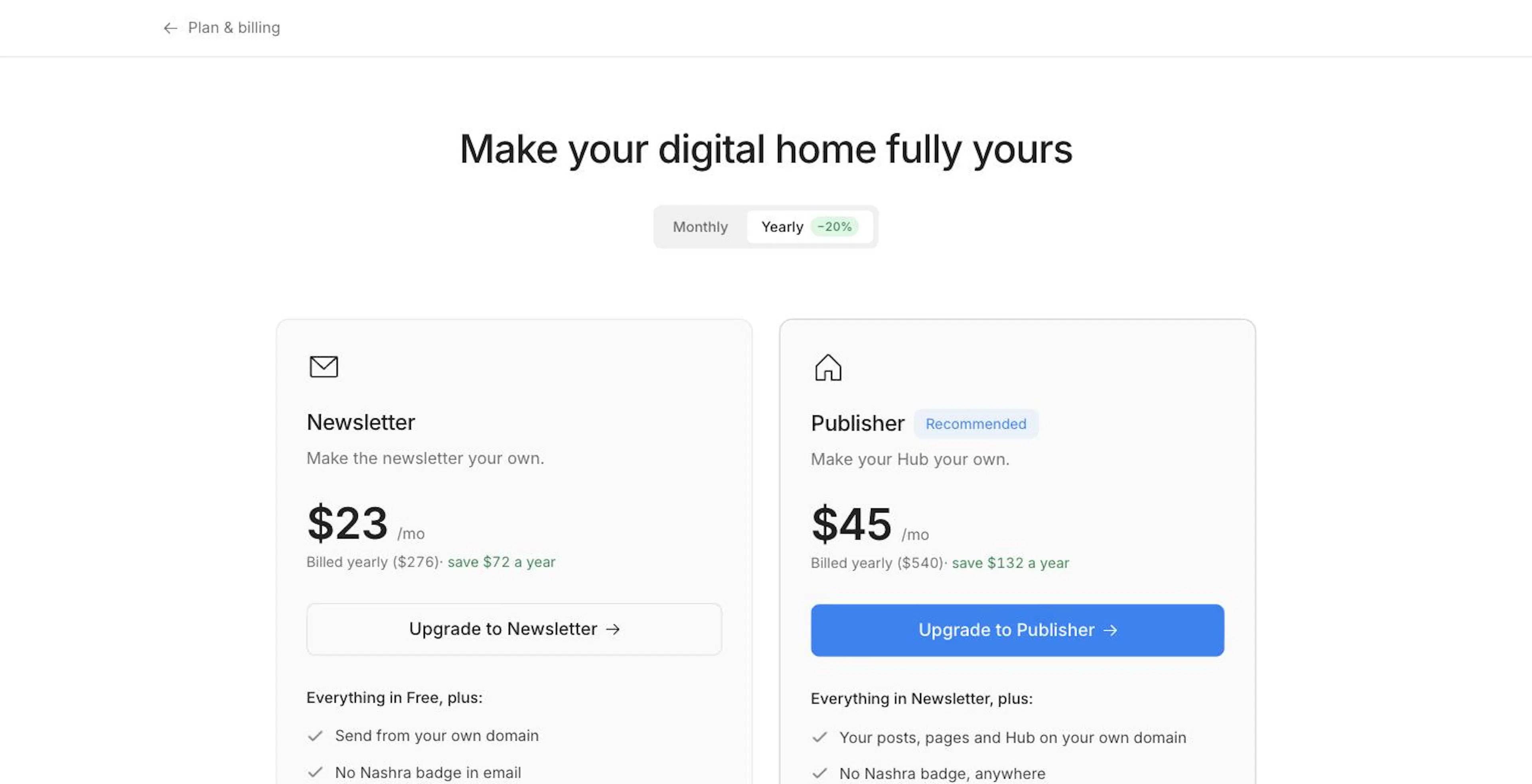
Make the newsletter your own. 3K–25K subscribers, priced by tier. Send from your own domain, with no Nashra badge in email.
Publisher
Make your Hub your own. Everything in Newsletter, plus your posts, pages, and Hub on your own domain, with no badge anywhere.
Enterprise
Over 25,000 subscribers, custom pricing, and multiple domains. Book a demo.
For current public pricing, visit nashra.ai/pricing.
Every plan publishes to the web. Posts, landing pages, the Hub, and resources publish on Free and Newsletter too — on your .nashra.website address with the Nashra badge. What Publisher adds is your own domain for them and no badge.
Included on every plan
- Unlimited posts, sent as email and published to the web
- Landing pages, the Hub, and resources
- A free
yourname.nashra.websiteaddress - Scheduled publishing
- Subscriber tags, segments, custom fields, and analytics
- Import and export your subscribers any time
- Custom fonts — see Brand & Identity
- API access
- Team collaboration — seats vary; see Team & Roles
- The AI Strategist — chat and post ideas, paid for with AI assists
- Insight cards, and spam and phishing protection
- Global, multi-language, and RTL support
Plan comparison
| Free | Newsletter | Publisher | |
|---|---|---|---|
| Publishing | |||
| Posts, landing pages, Hub, resources on the web | Yes | Yes | Yes |
| Where your pages live | Nashra subdomain | Nashra subdomain | Your own domain |
| Nashra badge on your pages and shared post images | Shown | Shown | Removed |
| Custom head code on your pages | — | Yes | Yes |
| Audience and sending | |||
| Subscribers | 500 | Your tier: 3K–25K | Your tier: 3K–25K |
| Emails per month | 5,000 | 10× your tier | 10× your tier |
| Send from your own domain | — | Yes | Yes |
| Nashra badge in email | Shown | Removed | Removed |
| Automations | 2 | 5 | Unlimited |
| Newsletters (lists) | 1 | 3 | 3 |
| Sending identities | 1 | 3 | 3 |
| Teammates besides the owner | 1 | 2, plus paid extra seats | 2, plus paid extra seats |
| AI | |||
| AI assists | 20 a month | 200 a month | 1,000 a month |
| AI Strategist chat and post ideas | Yes | Yes | Yes |
| Weekly Strategist suggestions | — | Yes | Yes |
| Support | |||
| Help centre | Yes | Yes | Yes |
| Human support | — | Yes | Yes |
| Onboarding call | — | — | Yes |
Each workspace connects one custom domain — it covers email sending and, on Publisher, website hosting together. Multiple domains are an Enterprise feature. See Custom Domains.
Prices by subscriber tier
Newsletter and Publisher scale by subscriber count, across the same 6 tiers. Prices are in USD:
| Tier | Subscribers | Emails/month | Newsletter (monthly) | Newsletter (billed yearly) |
|---|---|---|---|---|
| 3K | 3,000 | 30,000 | $29/mo | $23/mo |
| 6K | 6,000 | 60,000 | $49/mo | $39/mo |
| 10K | 10,000 | 100,000 | $74/mo | $59/mo |
| 15K | 15,000 | 150,000 | $99/mo | $79/mo |
| 20K | 20,000 | 200,000 | $124/mo | $99/mo |
| 25K | 25,000 | 250,000 | $149/mo | $119/mo |
Publisher uses the same tiers and limits at a flat $25/mo more than Newsletter ($20/mo more billed yearly) — from $54/mo at 3K up to $174/mo at 25K. Yearly billing saves about 20%.
Over 25,000 subscribers, plans are custom-priced — book a demo.
AI assists
Every AI generation you ask for spends one AI assist — a Strategist chat turn or batch of post ideas, a subject-line or summary suggestion, a landing-page composer run. Each change a connected AI assistant makes in your workspace over MCP uses one too, while reading is free — see Connect an AI Assistant. Insight cards are free and don't use assists.
| Plan | AI assists per month |
|---|---|
| Free | 20 |
| Newsletter | 200 |
| Publisher | 1,000 |
Your allowance resets on the 1st of each month. Settings → Plan and billing shows AI assists this month, and a short note after each generation tells you how many you have left. When you run out, AI features wait until the reset — or until you upgrade.
On paid plans, the Strategist also refreshes your post suggestions every week on its own. On Free, you generate them yourself.
A card to send email on Free
To send any email from a Free workspace — a post, an automation email, or a resource follow-up — you need a card on file. You won't be charged, and your plan doesn't change: the card confirms you're a real sender.
When you first try to send, Nashra asks you to Add a card or Upgrade plan. You can also add one any time from Settings → Plan and billing → Payment methods → Add card. Any paid subscription covers this on its own.
Publishing to the web never needs a card.
How limits work
Only subscribed contacts count toward your subscriber limit. Unsubscribed, bounced, and complained contacts don't.
- Nearing your limit — on Free, the plan meter in the sidebar turns amber at 80% of your subscribers.
- Over your subscriber limit — new subscribers can still join, but email pauses — posts, automation emails, and follow-ups — until you upgrade or reduce your list. Your site keeps publishing.
- Monthly email sends — your quota is 10× your subscriber tier and resets on the 1st of each month. Resource follow-up emails count toward it. When a send would take you past it, the send is blocked, and automation emails pause until the quota resets or you upgrade.
- A failed payment — email pauses until you update your payment method, then resumes on its own.
Follow-ups held by a limit
When a resource's follow-up email can't go out because of a plan limit or a missing card, Nashra holds it rather than dropping it, and emails the owner once to say follow-ups are paused. As soon as you upgrade, reactivate, pay an outstanding invoice, or add a card, the held follow-ups send automatically.
Changing your plan
Open the plans page
Go to Settings → Plan and billing and click Change plan, or click See plans on any locked feature. On Free, the Upgrade link on the sidebar's plan card also takes you to Plan and billing.
Pick billing and a tier
Choose Monthly or Yearly. Nashra preselects the smallest subscriber tier that fits your list — change it from the "prices for" menu. Under the plans, you'll see exactly what the next tier up would cost, so there's no surprise when your list grows.
Choose a plan
Click Upgrade to Newsletter or Upgrade to Publisher — or, on a paid plan, Move to another tier, Switch to yearly, or Downgrade to Newsletter. Compare every plan expands the full feature table.
Confirm
Your first subscription goes through Stripe Checkout. If you already have one, Nashra shows a preview first — the Credit for unused time, the prorated charge, and what's Due today (or Added to your balance when you move down) — then click Confirm. New features are available immediately.
Downgrading and cancelling
Move down a plan or tier from the plans page. To cancel, click Open portal under Billing history in Settings → Plan and billing. A cancelled plan stays active until the end of the billing period, and you can click Reactivate any time before then. Nothing is deleted when you move down — content, subscribers, and settings are kept.
What changes when a paid feature ends:
- The Nashra badge comes back on the surfaces your new plan doesn't cover.
- Your website — once your plan no longer includes website hosting, visits to your custom domain redirect to your
.nashra.websiteaddress. Your pages keep publishing there. - Your sending domain — once your plan no longer includes a custom sending domain, Nashra moves your senders, unsent campaigns, and automation emails to the shared domain within about an hour. Come back to a paid plan and they move straight back.
- Limits — if your subscribers exceed the new plan's limit, email pauses until you reduce your list or upgrade again.
See If your plan lapses for the domain details.
Managing billing
Settings → Plan and billing is open to the workspace owner and to teammates with Full access. See Team & Roles.
Settings → Plan and billing shows:
- Your plan — Current, Canceling, or Past due — with your next billing date and the Change plan button
- Meters for Subscribers and AI assists this month
- Payment methods — Add card, or remove one
- Billing history — invoices and receipts live in the Stripe portal; click Open portal
- Reactivate subscription — shown when your plan is set to end
If a payment fails, a Payment failed banner appears with an Update payment button.
Extra team seats are bought from Settings → Team when you invite someone and the workspace is full — see Team & Roles.
Referral program
Earn a commission when people you refer become Nashra customers. The program belongs to you as a person, not to a workspace, so anyone on a team can join.
Open it from Settings → Referral program, from Referral program in the account menu, or from the Referral program card that appears in the sidebar when your workspace passes a subscriber milestone.
Apply
Choose Your code (lowercase letters and numbers, up to 20), add Where you publish and How you’ll share Nashra, then click Send application.
Wait for review
Your application shows In review. Nashra emails you once it's been reviewed. If it isn't approved, you can apply again.
Share your link and code
Once you're approved, copy Your link and Your code from the same page.
How you earn:
| Term | Detail |
|---|---|
| You earn | 40% of what each referred customer pays in their first year, excluding tax |
| They get | 20% off their first year |
| Applies to | Publisher yearly plans |
- Someone who opens your link is credited to you for 60 days. A customer who types your code at checkout counts for you too.
- You don't earn on workspaces you own or belong to.
- A refund cancels the commission, or reduces it for a partial refund.
- Commissions become payable 30 days after each payment. They're paid out once you're owed at least $100, to the details you save under Where we pay you — a PayPal email, Wise, or bank details.
The page tracks New accounts, Paying customers, Earned, and To be paid, plus your latest commissions.