
Team & Roles
Invite teammates to a Nashra workspace and control what they can do — the Editor and Admin roles, the Publishing, Automations, and Full access capabilities, what only the owner can do, who can reach Plan and billing, accepting an invitation and signing up from it, each teammate's sender, seats per plan, and buying an extra seat.
Working together
Invite teammates to write, send, build automations, and run the day-to-day. Each teammate gets their own login, their own sender, and a role that decides what they can open.
Every plan includes at least one teammate. How many seats you get depends on your plan — see Seats.
Roles
Every workspace has one owner. When you invite someone, you pick one of two roles:
| Role | What they can do |
|---|---|
| Owner | Everything, including managing the team. One per workspace. |
| Admin | Full access — everything in the workspace, including settings, Brand, domains, API keys, and Plan and billing. |
| Editor | Publishing and Automations — create and send content, and build automations and pages. No workspace settings or billing. |
A role is really a set of capabilities, and the owner can adjust them per teammate from Edit:
| Capability | Opens |
|---|---|
| Publishing | Posts — email and web — and Audience |
| Automations | Automations, Forms, landing pages, resources, and the Hub |
| Full access | Everything, including workspace settings and billing |
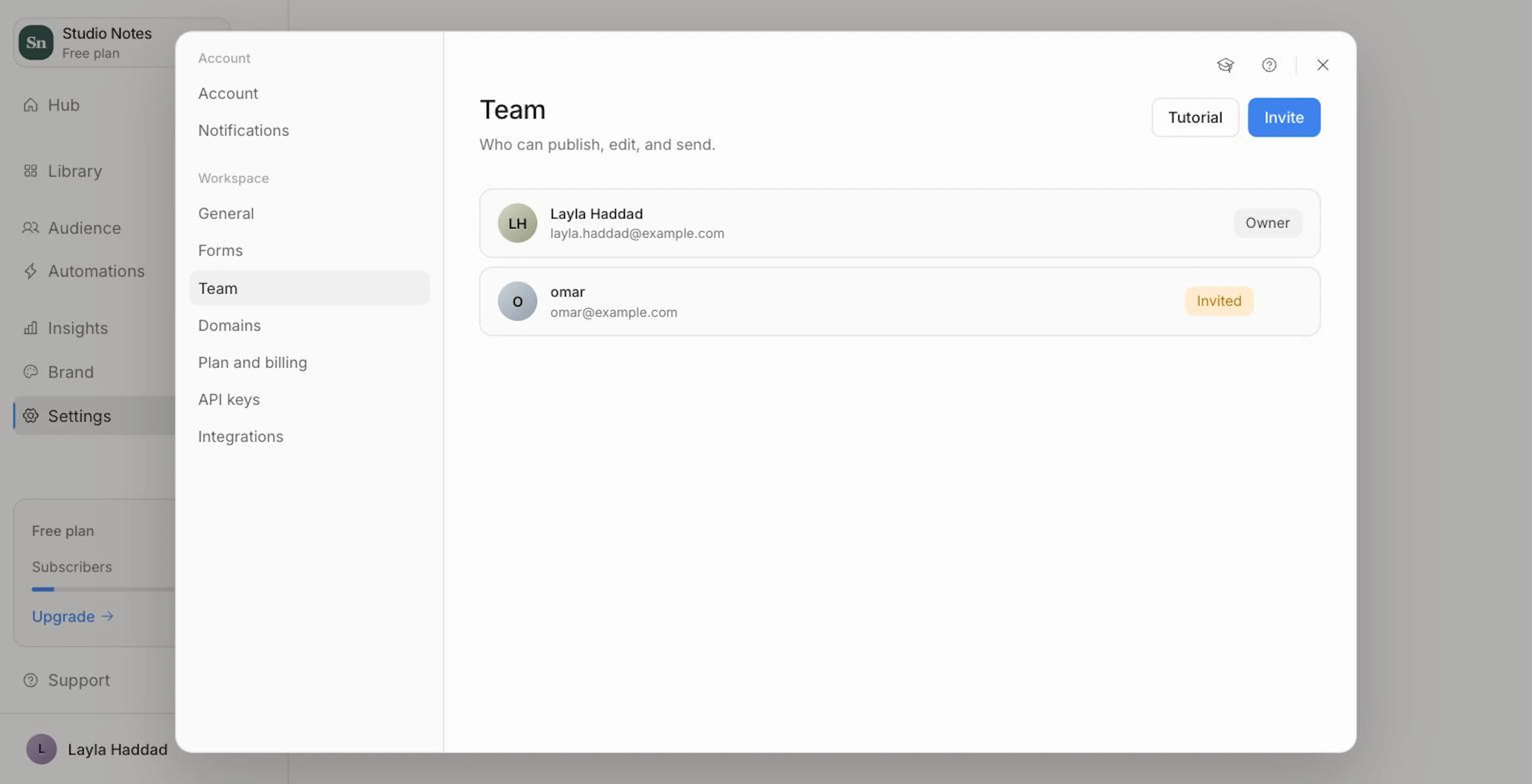
A teammate's card shows their capabilities — for example Publishing, Automations or Full access.
Role changes take effect immediately. A teammate who loses a capability loses access to it on their next click — no waiting, no signing out.
Owner-only actions
Only the workspace owner can:
- Invite teammates
- Edit a teammate's capabilities and sender
- Remove teammates and cancel invitations
Plan and billing is open to the owner and to anyone with Full access (Admins). It doesn't appear in Settings for anyone else.
Inviting a teammate
Open Settings → Team
Click Invite.
Enter their email and pick a role
Choose Editor or Admin, then click Send invite. You can change their role any time.
The invitation shows on your team list as Invited until it's accepted. It expires after 7 days. To withdraw it, open its menu and choose Cancel invitation. A pending invitation uses a seat.
Accepting an invitation
Your teammate gets an email with a link to join:
- Already on Nashra? They see the workspace, who invited them, their role, and when the invitation expires. They click Accept invitation (or No thanks), then set up their photo, Display name, Send from address, and Replies to — and click Finish & join workspace.
- New to Nashra? The link opens a sign-up page to join your workspace. Their email is already filled in from the invitation. They add their name and choose their sender address as part of signing up.
Managing the team
From Settings → Team, open a teammate's menu:
- Edit — change their Display name, Sender identity (the "from" address subscribers see), Capabilities, and Replies to. Click Save changes.
- Remove — they lose access to the workspace right away. Their sender is removed with them, so reassign any automation that sends as them. Content they created stays in the workspace.
Each teammate's sender
Every teammate has their own sender — a display name and a "from" address like mo@yourdomain.com — plus where replies go. Teammates set their own Send from address and Replies to in Settings → Account, and their sender name from the send dialog. The owner can change any teammate's from Edit. Each address can belong to only one sender. See Sending Domain.
Senders are also what an automation's Author picker offers — see Automations.
Seats
| Plan | Teammates included (besides the owner) | Extra seats |
|---|---|---|
| Free | 1 | Not available — upgrade instead |
| Newsletter | 2 | $10/month, or $84/year on yearly billing |
| Publisher | 2 | $10/month, or $84/year on yearly billing |
| Enterprise | Custom | Contact us |
Seats count teammates who've joined plus invitations still pending.
When you invite someone and the workspace is full:
- On Newsletter or Publisher, the invite dialog offers Add a team seat. Confirm the seat — it's billed with your subscription — and the invitation goes out as soon as the seat is added.
- On Free, the dialog asks you to upgrade instead. Click View plans.
See Plans & Billing for the full plan comparison.
Deleting your account
Settings → Account → Delete account isn't scoped to one workspace. It removes you from every workspace you belong to, and deletes any workspace you created, for everyone. There's no in-app way to leave a single workspace while keeping your account, or to transfer ownership to someone else. To delete just one workspace you own, use Settings → General → Delete workspace — see Brand & Identity.